Record four cameras on the computer you already own.
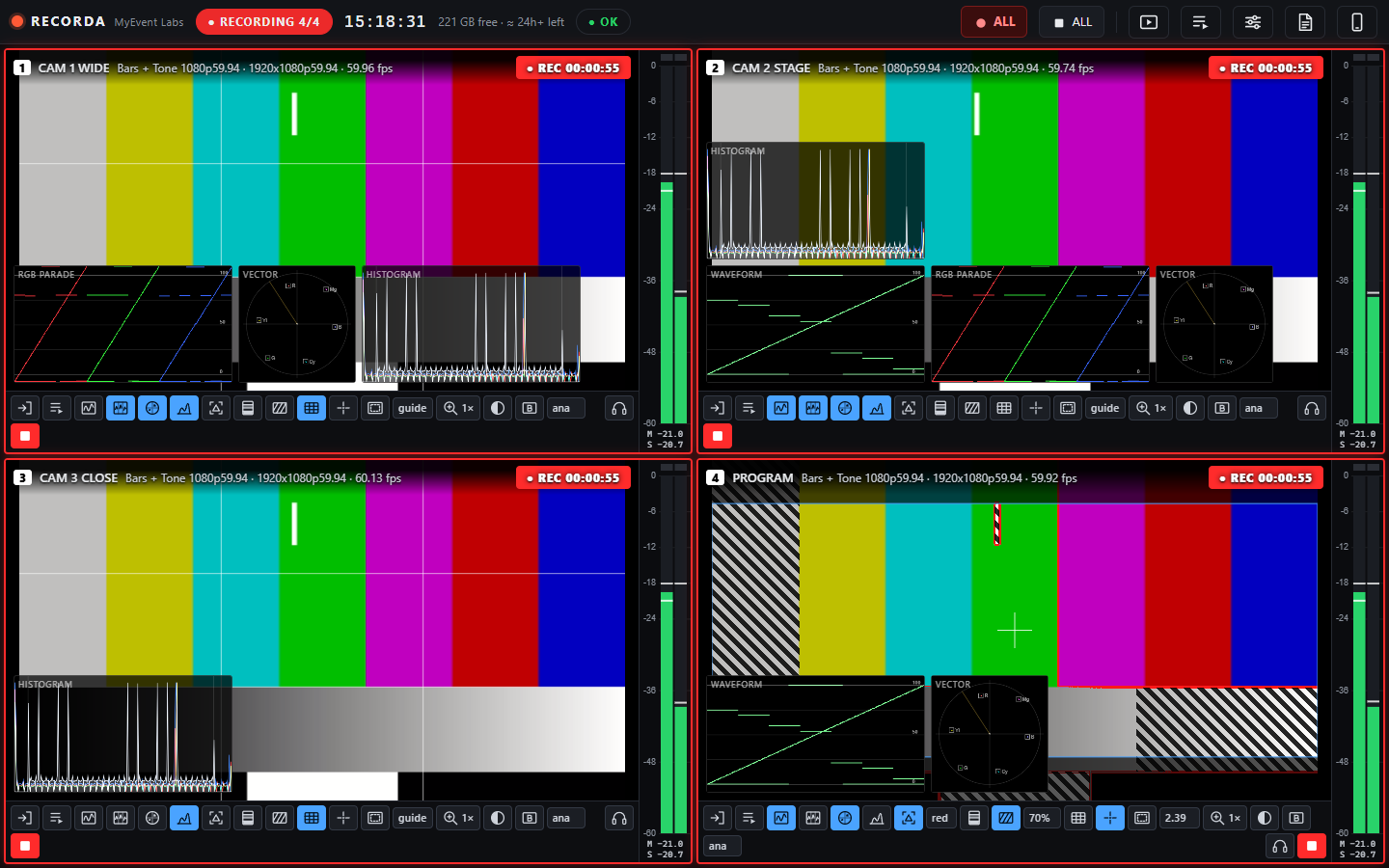
Recorda is a four-channel recorder and monitor for Windows and macOS. Scopes, focus and exposure tools, audio meters, instant playback and playlists, in one small app.
Free to try with no card. A$199 once if you keep it.
Built for the person who has to get the recording right.
- Sources
- NDI, USB capture devices including HDMI and SDI dongles, webcams, and any screen with its system audio. Blackmagic DeckLink and UltraStudio support is in beta. Bars and tone are built in for sync checks.
- Scopes and exposure
- Luma waveform, RGB parade, vectorscope and histogram on every channel, measured from the full-resolution picture. Focus peaking, false colour, zebra, guides and punch-in zoom.
- Audio
- Peak and RMS meters for every audio channel, clip indicators, loudness readout, and a headphone monitor for any input.
- Recording
- H.264, HEVC, ProRes, DNxHR or uncompressed, to MP4, MOV or MKV, encoded on the graphics card where available. Record All starts every channel on the same frame with matching timecode. Files stay playable if the power goes.
- Playback while recording
- Any channel can play clips while the others keep recording. One button returns it to the live input straight away.
- Quick edits
- Trim the start and end, add audio fades, normalise loudness, compress, cut low rumble and reduce noise. Fast export finishes in seconds. Frame-accurate export runs on the graphics card.
- Playlists
- One playlist per channel and a shared one for any channel. Each item has its own in and out points and a choice of what happens at the end: play the next clip, hold the last frame, fade to black, loop, or go back to live.
- Phone remote
- Scan a code to start and stop recording, watch thumbnails and levels, and listen to any channel from a phone on the same network.
- Health at a glance
- Processor load, free disk space with recording time left, and a status light that changes on dropped frames, audio gaps or errors. Every session is written to a log.
Try it for free. Pay once if you keep it.
Free trial
Free
- Every feature and all four channels
- Each recording stops at 5 minutes
- No card needed and no end date
Full version
A$199
- Record for as long as you have disk space
- One payment, no subscription
- Updates through version 1 included
Buying gives you a licence key. Enter it in the trial you already have and the limit lifts without reinstalling.
Questions
What do I need to run it?
Windows 11, or macOS 13 and later on Apple silicon or Intel. The macOS version is newer and in beta. A recent graphics card helps when recording four channels at once. NDI sources need the free NDI Tools installed, and Blackmagic devices need Desktop Video.
What exactly is limited in the trial?
Only the length of each recording, which stops at 5 minutes. Everything else works, on all four channels, for as long as you like.
Is it really a single payment?
Yes. You pay once and the app is yours to keep. There is no subscription and no account needed to keep using it.
Can I use it on more than one computer?
The licence is for one operator. Install it on the machines you run yourself.
Why does my computer warn me when I install it?
The installers are not code-signed yet, so Windows and macOS ask you to confirm the first time you open the app. On macOS, right-click the app and choose Open.
Does it need an internet connection?
Only to activate a licence and to check for updates. Recording, playback and editing work offline, and an activated licence keeps working without a connection.
How do I get updates?
The app checks for a newer version when it starts and shows an Update button in the top bar. Selecting it downloads the new installer.
Can I get a refund?
Yes, within 14 days of buying. Use the contact link at the bottom of this page.